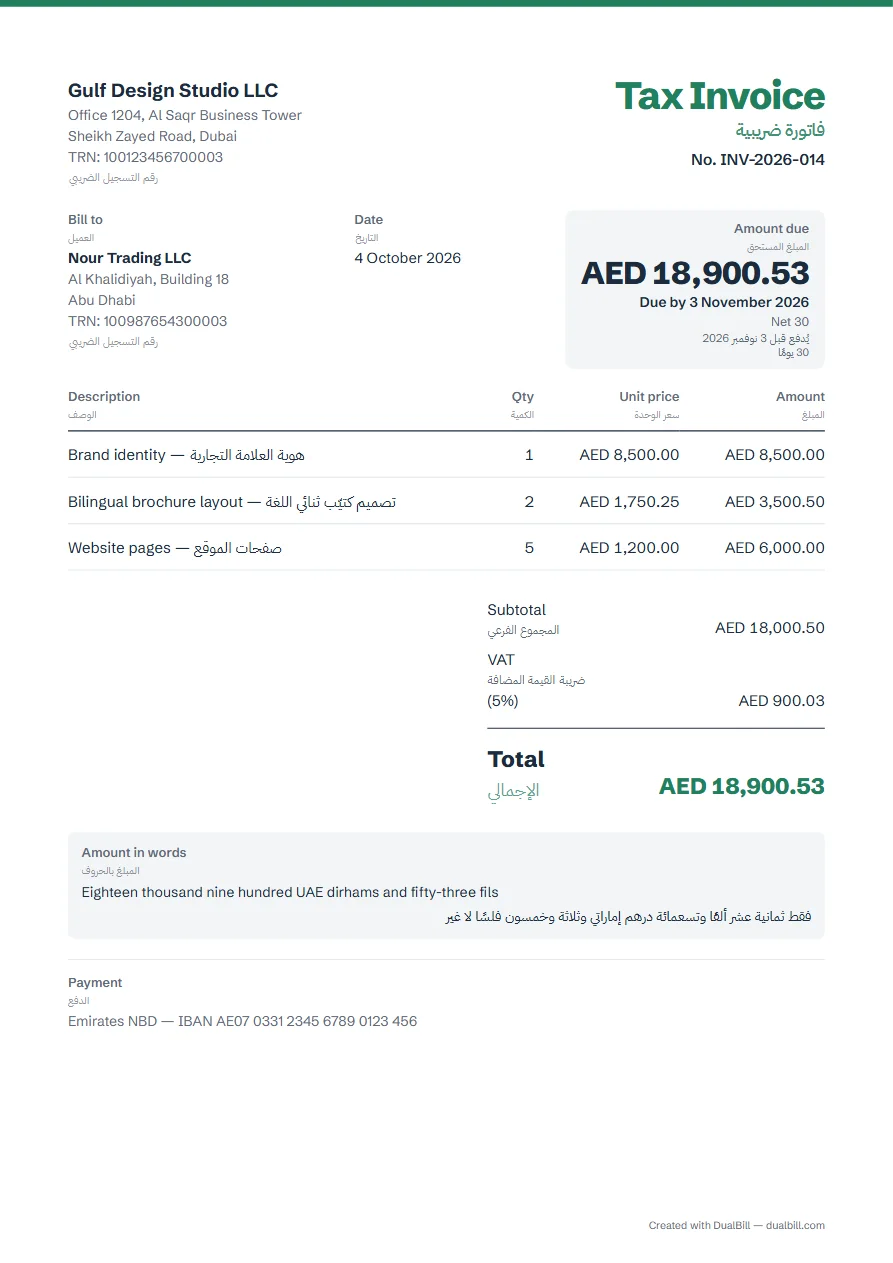
This invoice is set up for the United Arab Emirates in English and Arabic: every label prints in both, the title reads “Tax Invoice” and “فاتورة ضريبية” once you add your TRN, and VAT is the standard 5%. The total can be written in words in dirhams and fils.
No sign-up · No watermark · Your data stays on your device
Your browser is blocking storage (private browsing?): this document will not be kept if you close the page. Download it before leaving.
This browser's storage is full: the document stays on screen but is no longer saved. Remove an image or delete old documents.
This document link is invalid or incomplete. Ask the sender to send it again.
Line deleted.
Amount dueAED 0.00
Your businessاسم شركتك
Invoiceفاتورة
No. INV-2026-001
Bill toالعميل
—
Dateالتاريخ
25 October 2026
Amount dueالمبلغ المستحق
AED 0.00
Due by 24 November 2026
Net 30
يُدفع قبل 24 نوفمبر 2026
30 يومًا
Descriptionالوصف
Qtyالكمية
Unit priceسعر الوحدة
Amountالمبلغ
Add a line to get started.أضف بندًا للبدء.
Subtotalالمجموع الفرعيAED 0.00
VATضريبة القيمة المضافة (5%)AED 0.00
TotalالإجماليAED 0.00
“Tax Invoice” or “Invoice”: your TRN decides
A business registered for VAT issues a tax invoice that displays the words “Tax Invoice” (Executive Regulation, art. 59). Enter your 15-digit TRN in “Your details”: the title becomes “Tax Invoice” above “فاتورة ضريبية”, and a credit note “Tax Credit Note” above “إشعار دائن ضريبي”.
The TRN is optional. Without it, the document stays an “Invoice”, or “فاتورة”. If you charge VAT without a TRN, “Required details” reminds you to check your registration status.
What a UAE tax invoice shows
Article 59 lists the details: your name, address and TRN; your client's, with their TRN if they are registered; a sequential number; the date of issue, and the date of supply if it is different; each line with its unit price, quantity, VAT rate and amount; the total and the VAT in dirhams.
Enter the “Date of supply (if different)” in “Number and dates”, and your client's TRN in “Client: type and IDs”. “Legal notices”, under “Payment and notes”, offers the reverse charge statement, which cites article 48 of the Decree-Law. The tax invoice is issued within 14 days of the date of supply (Decree-Law, art. 67). The generator adapts the fields to the chosen country. Check the obligations that apply to your situation.
Invoicing in dollars or euros
The VAT and the total must also appear in dirhams, converted at the rate approved by the Central Bank on the date of supply (Decree-Law, art. 69). When you choose another currency in “Languages and currency”, both conversions are ticked. Type the rate as the Central Bank's tables print it, in dirhams for one unit of the other currency: its table for August 2025 gives 3.6725 for one US dollar on 1 August 2025.
The total in words, in UAE dirhams and fils
“Write the total in words” is ticked when Arabic is one of the document's languages: “فقط ألف ومائتان وخمسون درهمًا إماراتيًا وخمسون فلسًا لا غير”. The Arabic follows the grammar of the number, and is framed by “فقط” and “لا غير” so that nothing can be added to the amount.
Electronic invoicing from 2027
Ministerial Decision No. 244 of 2025, amended in May 2026, phases in electronic invoicing between businesses and to government: 1 January 2027 for businesses with revenue of AED 50 million or more, 1 July 2027 below that, 1 October 2027 for government entities, through an accredited service provider. Sales to consumers stay outside it. A PDF from this generator is not an electronic invoice under these decisions; “Required details” shows this timetable with the date it was last checked. Saudi Arabia uses FATOORA.
Short English–Arabic glossary
The labels the generator prints for the UAE, taken from the terms of the UAE VAT texts. To use other words, rename any label in “Appearance”, under “Document labels”.
English
العربية
Tax Invoice
فاتورة ضريبية
Tax Credit Note
إشعار دائن ضريبي
Invoice
فاتورة
Estimate
عرض أسعار
Proforma invoice
فاتورة أولية
TRN
رقم التسجيل الضريبي
Bill to
العميل
Date
التاريخ
Date of supply
تاريخ التوريد
Due date
تاريخ الاستحقاق
Description
الوصف
Qty
الكمية
Unit price
سعر الوحدة
Amount
المبلغ
Subtotal
المجموع الفرعي
VAT
ضريبة القيمة المضافة
Total
الإجمالي
Amount due
المبلغ المستحق
Amount in words
المبلغ بالحروف
Example of an English–Arabic tax invoice made with this generator (fictitious data).
Frequently asked questions
Does a UAE invoice have to be in Arabic?
The VAT Decree-Law and its Executive Regulation set no language for the invoice itself. The Tax Procedures Law does: tax records and documents submitted to the Federal Tax Authority are in Arabic, and the Authority may accept another language and then ask for an Arabic translation (art. 5).
Can I issue a simplified tax invoice?
The Executive Regulation allows one when your client isn't registered for VAT, or when they are and the supply doesn't exceed AED 10,000, except for a reverse charge supply (art. 59). The generator prints the details of a full tax invoice; “Required details” tells you when a simplified one is possible. The UAE tax invoice guide compares the two.
Can I make a credit note in English and Arabic?
Yes. Choose the credit note as the document type, then enter the original invoice number and the “Reason for the credit note”, which prints under the number. The estimate and the proforma invoice keep both languages too. For a document in a single language, use the invoice generator.
My client reads Arabic first. Can I swap the languages?
Yes. In “Add details”, open “Languages and currency”, then set Arabic as the “Document language” and English as the “Second language”. The document then runs from right to left, with English under each Arabic label.