Your business
Invoice
No. INV-2026-001
| Description | Qty | Unit price | Amount |
|---|---|---|---|
| Add a line to get started. | |||
Subtotal$0.00
Total$0.00
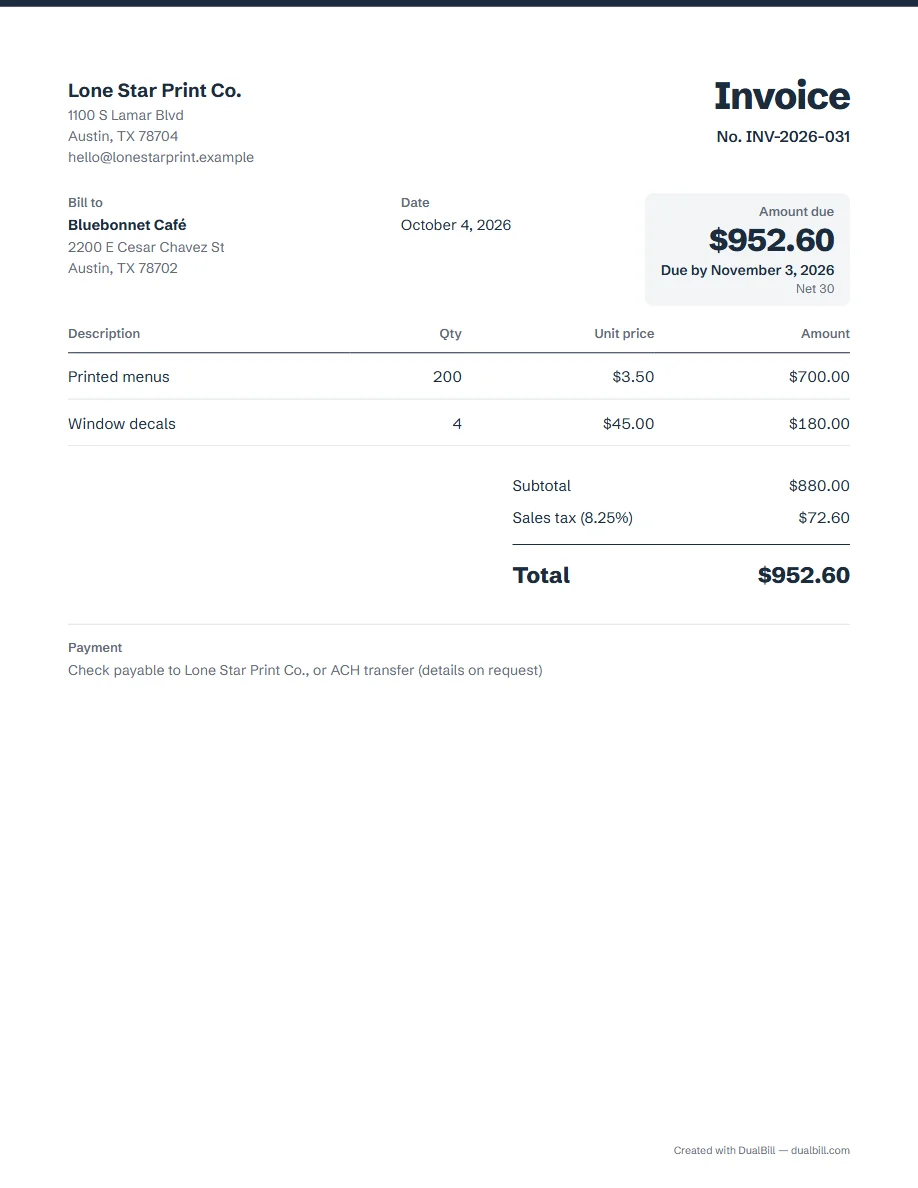
An invoice tells your client what they owe, for what, and by when. Start with your details and the client's, give the invoice a number and a date, list each item with its quantity and price, add sales tax if it applies, then show the total and how to pay. The example marks each part.
No sign-up · No watermark · Your data stays on your device
Your browser is blocking storage (private browsing?): this document will not be kept if you close the page. Download it before leaving.
This browser's storage is full: the document stays on screen but is no longer saved. Remove an image or delete old documents.
This document link is invalid or incomplete. Ask the sender to send it again.
Line deleted.
Amount due$0.00
| Description | Qty | Unit price | Amount |
|---|---|---|---|
| Add a line to get started. | |||
Put your business name, address and an email or phone number at the top, so the client knows who is billing and how to reach you. The generator remembers them for next time.
Give each one its own number and never reuse one: INV-2026-001, then INV-2026-002. The guide to invoice numbers explains the usual formats.
Under “Bill to”, write the person's or the company's name and the billing address.
The invoice date is the day you issue it. If the work was done on another day, add that date too, under “Number and dates”.
Terms such as Net 30 mean the client pays within 30 days of the date in step 4. Choose them under “Number and dates”: the due date is printed next to the amount due.
Describe each product or service so the client recognizes it, with a quantity and a unit price; the amounts and the subtotal are calculated for you. To bill by the hour, use the freelance invoice.
Sales tax depends on the state and the locality, and some sales are not taxed. Enter the rate that applies: the US invoice guide explains how it works and where to check it, and the sales tax calculator checks a single amount.
The total adds the lines and the tax, minus any discount or deposit already paid. It appears under the lines and, as the amount due, at the top.
Say how you want to be paid: check, ACH transfer, Zelle, PayPal or an online payment link. Under “Payment and notes”, “Insert a payment template” adds a ready line, and a payment link prints a QR code your client can scan.
We found no federal list of required details. The US invoice guide explains what we found and links to the official sources.
Yes. The invoice generator works in the browser with no account, and downloads the invoice as a PDF or sends it as a link.
When the client pays, you can give a receipt. If the due date passes, send a payment reminder.